Clean Architecture in Flutter: separating layers without the overhead
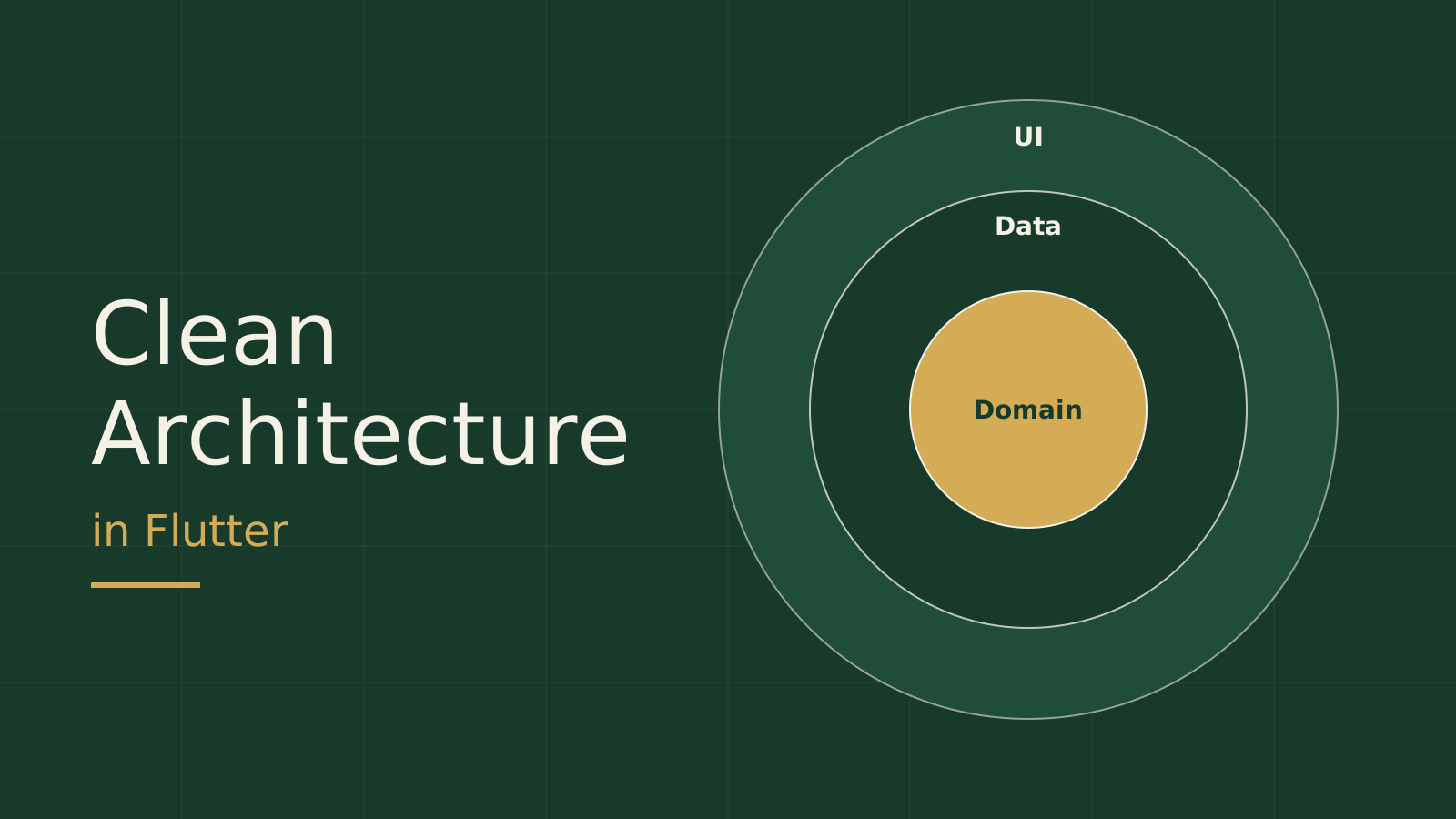
Many Flutter apps start clean and slowly turn into huge widget files that mix network calls, data mapping and business rules in one place. At that point every small change feels risky, and testing the logic without running the UI is close to impossible. Clean Architecture exists to solve exactly this problem, but it is often applied far more heavily than needed. This article takes the practical version: what to separate, why, and where to stop.
The problem we are actually solving
The goal is not to have many folders. The goal is that parts of the app can change for different reasons without breaking each other. The screen changes because the design changed. The JSON changes because the backend changed. A business rule changes because the product changed. If all of that lives in one widget, every change touches everything. Separating layers means each reason to change has one clear home.
The core rule: dependencies point inward
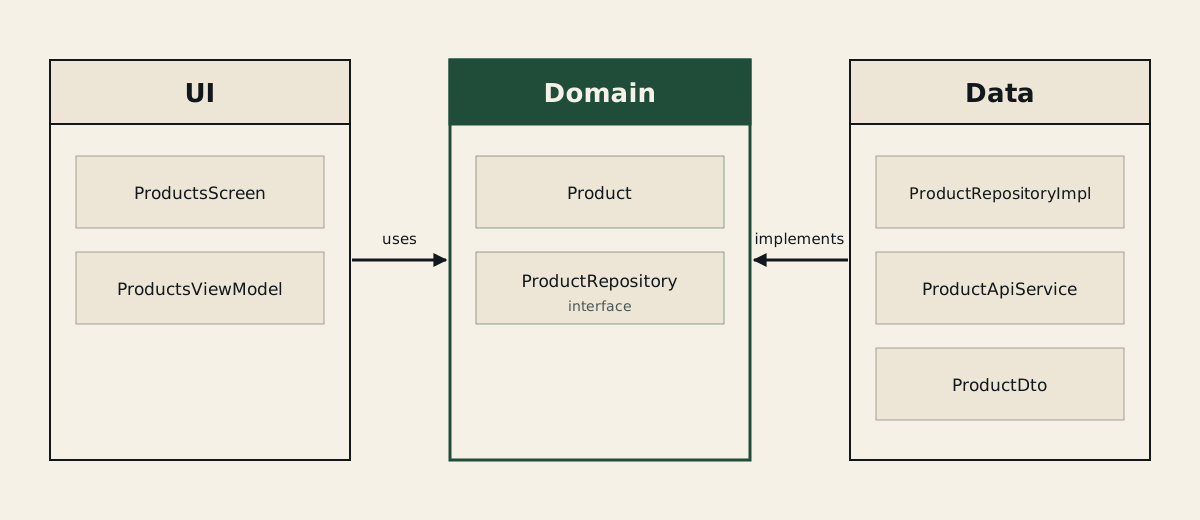
The one rule worth memorising: inner code (business rules) knows nothing about outer code (UI, network, database). The UI depends on the logic, and the concrete data implementation depends on a contract (an interface) that the logic defines, not the other way round. That is what lets you swap a data source, or test the logic with a simple fake, without running anything real.
Layers: three are enough for most apps
The official architecture guide in the Flutter documentation splits an app into a UI layer, a Data layer, and an optional Domain layer between them. We will use that split because it is practical and comes from the Flutter team itself.
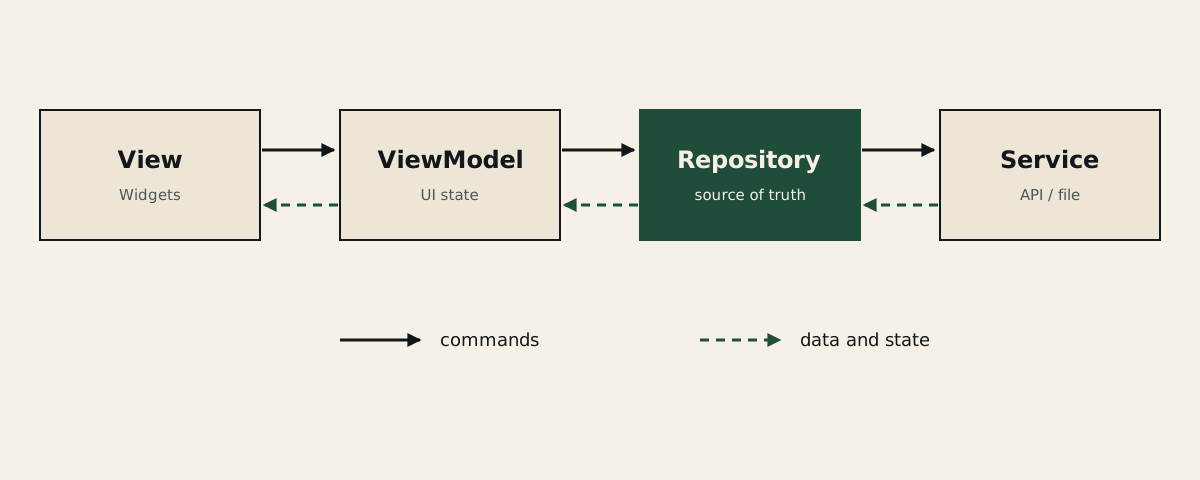
UI layer: Views are the widgets that render state and forward user events; a ViewModel turns data into display-ready state and exposes commands the view calls. A view holds no business logic, only simple conditions for showing, hiding, layout and animation.
Data layer: a Repository is the single source of truth for one type of data. It handles caching, error handling and retries, and it returns domain models. Below it, a Service wraps exactly one data source, such as a REST API or a local file, and holds no state.
Domain layer (optional): plain business models and, when needed, Use Cases. Do not add it just because it appears in the diagrams; we will come back to this after the example.
A practical example in Dart
The following example is illustrative and simplified (a product list), not code copied from a specific project. We start with the Domain: the model and the contract.
class Product {
  const Product({
    required this.id,
    required this.name,
    required this.priceInCents,
  });

  final String id;
  final String name;
  final int priceInCents;
}

// The contract: the Domain defines it, the Data layer implements it.
abstract interface class ProductRepository {
  Future<List<Product>> getProducts();
}
Notice that this file imports no package at all: no flutter, no http. That is the point. Now the Data layer: the DTO knows the JSON shape, the Service talks to the network, and the Repository connects them and returns a domain model.
import 'dart:convert';
import 'package:http/http.dart' as http;
import '../domain/product.dart';

class ProductDto {
  const ProductDto({
    required this.id,
    required this.name,
    required this.priceInCents,
  });

  factory ProductDto.fromJson(Map<String, dynamic> json) => ProductDto(
        id: json['id'] as String,
        name: json['name'] as String,
        priceInCents: json['price_in_cents'] as int,
      );

  final String id;
  final String name;
  final int priceInCents;

  Product toDomain() =>
      Product(id: id, name: name, priceInCents: priceInCents);
}

class ProductApiService {
  ProductApiService(this._client, this._baseUrl);

  final http.Client _client;
  final String _baseUrl;

  Future<List<ProductDto>> fetchProducts() async {
    final response = await _client.get(Uri.parse('$_baseUrl/products'));
    if (response.statusCode != 200) {
      throw Exception('Failed to load products: ${response.statusCode}');
    }
    final list = jsonDecode(response.body) as List<dynamic>;
    return [
      for (final item in list)
        ProductDto.fromJson(item as Map<String, dynamic>),
    ];
  }
}

class ProductRepositoryImpl implements ProductRepository {
  ProductRepositoryImpl(this._service);

  final ProductApiService _service;

  @override
  Future<List<Product>> getProducts() async {
    final dtos = await _service.fetchProducts();
    return dtos.map((dto) => dto.toDomain()).toList();
  }
}
If the backend renames price_in_cents to something else, the change lives in the DTO file only. Neither the ViewModel nor the widget knows anything happened. Now the UI layer: the ViewModel depends on the contract, not on the implementation.
import 'package:flutter/foundation.dart';
import '../domain/product.dart';

class ProductsViewModel extends ChangeNotifier {
  ProductsViewModel(this._repository);

  final ProductRepository _repository;

  List<Product> products = const [];
  bool isLoading = false;
  Object? error;

  Future<void> load() async {
    isLoading = true;
    error = null;
    notifyListeners();
    try {
      products = await _repository.getProducts();
    } catch (e) {
      error = e;
    } finally {
      isLoading = false;
      notifyListeners();
    }
  }
}
The view listens to the ViewModel and only renders state; it knows nothing about http or JSON. At the app's entry point (the composition root) you create the objects and pass them along: Service, then Repository, then ViewModel, either by hand through constructors or with the dependency-injection tool you prefer. The tool is a detail; the direction of dependencies is what matters.
The immediate payoff is testing: instead of a real network call, you write a fake for the contract and test the ViewModel in seconds.
class FakeProductRepository implements ProductRepository {
  FakeProductRepository({this.shouldFail = false});

  final bool shouldFail;

  @override
  Future<List<Product>> getProducts() async {
    if (shouldFail) throw Exception('network down');
    return const [Product(id: '1', name: 'Sample', priceInCents: 1000)];
  }
}

void main() {
  test('load exposes products', () async {
    final vm = ProductsViewModel(FakeProductRepository());
    await vm.load();
    expect(vm.products, hasLength(1));
    expect(vm.error, isNull);
  });

  test('load exposes error on failure', () async {
    final vm = ProductsViewModel(FakeProductRepository(shouldFail: true));
    await vm.load();
    expect(vm.products, isEmpty);
    expect(vm.error, isNotNull);
  });
}
When to add a Use Case, and when not to
The example above has no Use Case, on purpose. If a Use Case calls one repository method and returns its result unchanged, it is an extra layer with no value. The official documentation itself describes the Domain layer as optional, and suggests it when logic combines data from more than one repository, is very complex, or is reused by more than one ViewModel.
A simple decision rule: start without Use Cases. When you catch yourself copying the same logic between two ViewModels, or a ViewModel needs to combine two repositories, create a Use Case then. Also remember that repositories do not depend on each other; combining happens in the ViewModel or in a Use Case.
Common mistakes
First, passing the DTO straight to the UI. That ties the JSON shape to the screen and cancels the benefit of the separation. Always convert to a domain model at the repository boundary.
Second, putting business logic inside the widget, such as calculating a discount or validating an order inside build. It belongs in the ViewModel or the Domain.
Third, applying every layer to every feature equally. A simple settings screen does not need what a checkout flow needs. Choose the level of separation based on the feature's complexity and the cost of getting it wrong.
Fourth, mixed dependencies: a Domain file that imports flutter or http. If that happens, the core rule is broken, and it is the easiest violation to spot with a glance at the imports.
Folder structure
Folder layout is a secondary detail, but organising by feature (feature-first) usually makes maintenance easier because everything about a feature sits in one place. An illustrative example:
lib/
  features/
    products/
      domain/
        product.dart
      data/
        product_repository_impl.dart
      ui/
        products_view_model.dart
        products_screen.dart
  main.dart   # composition root: creates the objects and wires them together
Summary
Clean Architecture in Flutter is not a template to copy; it is one rule: logic does not depend on outer details. Let the view only render, the ViewModel shape state, the Repository own the data, and the Domain stay free of packages. Add a Use Case when a real reason appears, not before. If you want to go further, start with the official architecture guide in the Flutter documentation and adapt it to the size of your project.